

Hey!
During discussions about a Sitecore upgrade, one of the first questions customers often ask is: What will happen to our content items?
On the tech dark side, a developer facing the migration for the first time may ask: Should we migrate the content using packages? Unicorn? Maybe TDS?
These are good questions, and among all the steps involved in the Sitecore Upgrade, what usually happens is a database adaptation.
In a few words, I’d like to say that we will transform the database – like a metamorphosis 🦋 – from 9.3 to 10.4.
My goal here is to bring more clarification to this process and how to do it as well. Let’s see how it works. ✨
Prerequisites:
First, we need some tools to do the dirty job, so make sure you have installed:
- SQL Management Studio
- Powershell Script
- Sitecore Upgrade Guideline: Download here. This will be our guideline and support throughout the process.
Step 1: Download Scripts
I mentioned we’re performing a transformation, and to do that, we use a set of scripts to add, delete, and update the data of the current databases. There are two types: PowerShell scripts and SQL Queries.
Sitecore provides them, so download it:
- SQL Queries: Download them here. We will execute them later on SQL Managment Studio.
- Powershell Scripts (or also called UpdateApp Tool): They named it as a “tool”, but behind the hood, this is just a Powershell script. Download the latest version(e.g., version 1.4.1).
Those guys will do the magic. 🪄
Step 2: Prepare the Analytics Database
For environments with xDB enabled:
- Stop all applications accessing Analytics (e.g., xConnect, Processing Engine).
- Verify the
ProcessingEngineTasks.Taskstable to ensure there are no pending tasks. Wait them to finish. - Stop all active content tests (e.g., A/B tests).
Step 3: Transforming the Database
This step involves converting the database schema and data from version 9.3 to 10.4.
💡 If you’re in an early version, this also applies to you, but with some differences where you should double-check into the ‘Upgrade Guide for Sitecore Experience Platform 10.4.0.
3.1. Clean Up the Content Databases
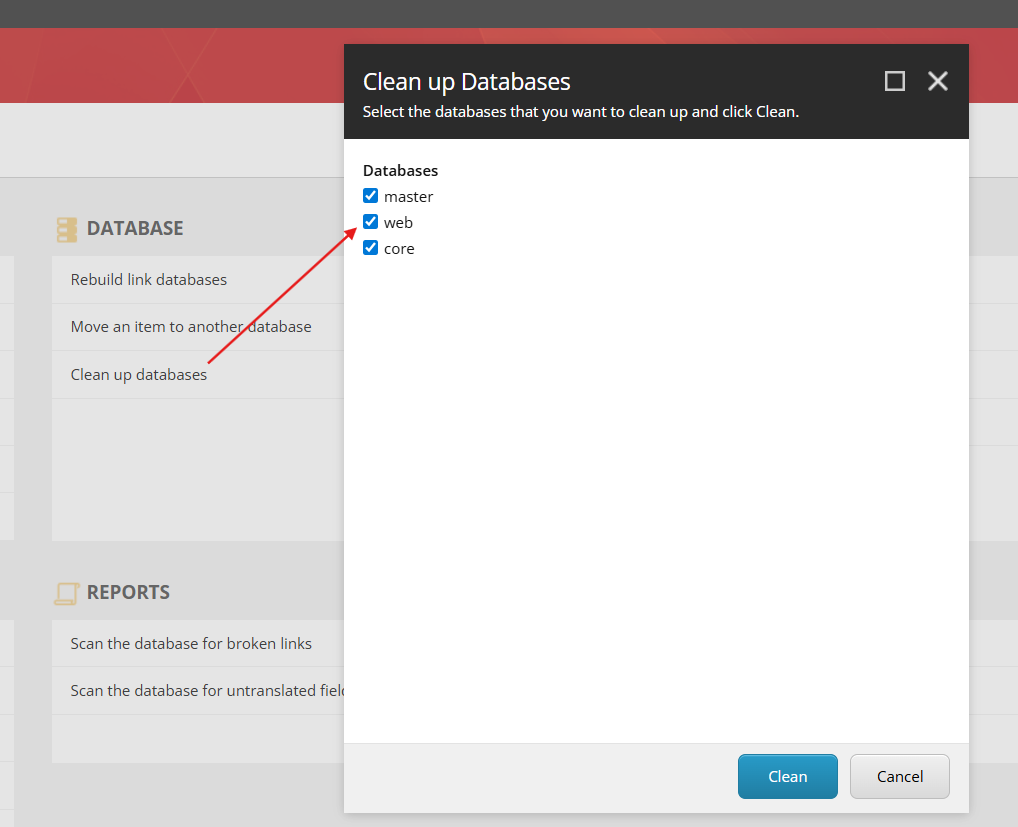
We start cleaning up some unnecessary data, and Sitecore does it for us. So, in the Sitecore 9.3 database, first go to the Control Panel > Database > Clean up databases:
3.2. Backup Databases
We need to take a full backup of the following databases from Production:
- Core
- Master
- Web
- And the other ones (e.g., Reporting, Shards, Forms, etc.)
💡If you’re hosting on Azure, I recommend storing these backups in a Storage Account that belongs to the current Azure Resource Group of the Sitecore 10.4 pipeline. It facilitates restoring the databases for the new solution.
3.3. UpdateApp Tool – Cleaning up Items as Resources
As part of the Sitecore XP upgrade process, this step focuses on updating the content databases. During this step, only the Core, Master, Web, and Security databases will be updated, as they are the content-related databases managed by Sitecore.
The Sitecore.UpdateApp tool (behind the hoods, it’s just PowerShell scripts) cleans up these databases by removing default items that have been migrated to Items as Resources in the newer versions.
Other databases, such as Reporting and Shards, will be updated in later steps, don’t worry 😉.
Run the UpdateApp Tool against the dababases backups generated in the section 3.2!
💡 For more guidelines, refer to section 3.1.1. of the ‘Upgrade Guide for Sitecore Experience Platform 10.4.0.
3.4. SQL Queries – Cleaning up the Others
In this step, we’ll clean up and update the schemas for all the databases (yes – master, core, web again + the other ones).
For this one, we need to execute SQL queries, again against the backup databases, in order to adapt the schema and data for the content database, but also the others.
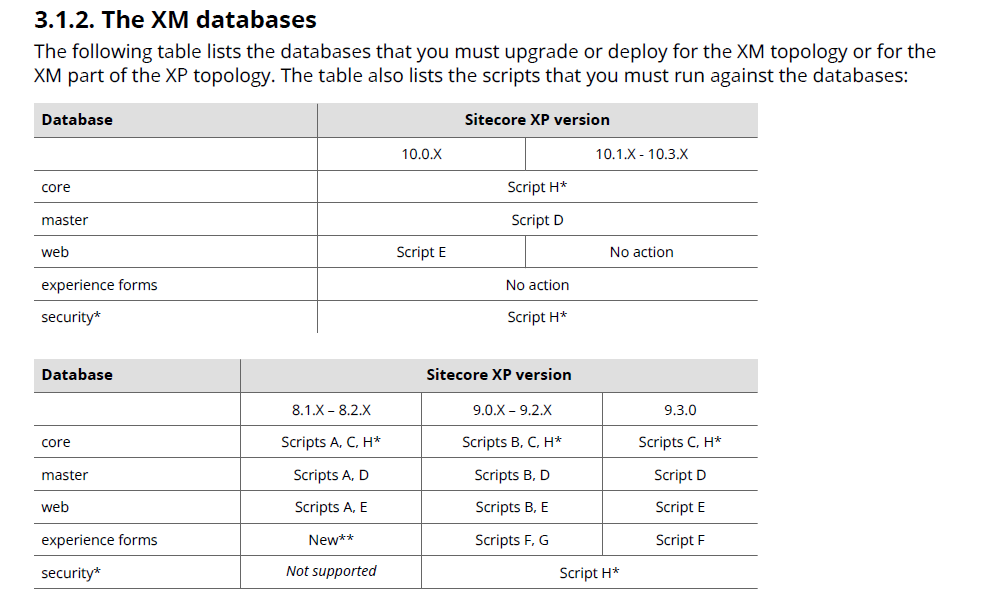
There is a good set os queries that need to run depending on your architecture and I recommend taking a look on the whole information of sections 3.1.2, and 3.1.3. Please, read all the pages, they contain important info.
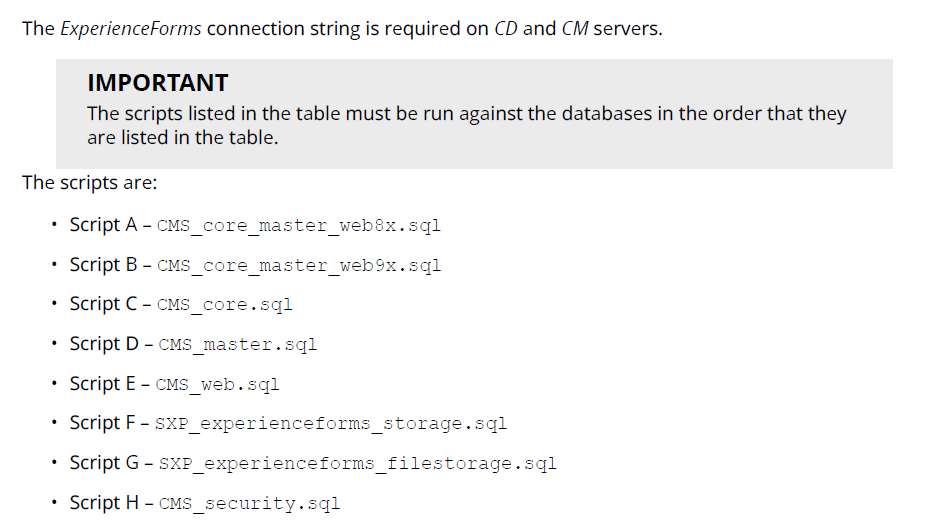
For example, for version 9.3, we should run Script D for master, Script E for web, and Script C and H* for the core database:
Where each of the scripts corresponds to:
💡 For more guidelines, refer to section 3.1.2. and 3.1.3. of the ‘Upgrade Guide for Sitecore Experience Platform 10.4.0.
3.5. Database User’s credentials
🚨Very important step.
When we backup the Production database it also comes with the users from Production which will differ from the new environment.
💡 If you’re hosting on Azure and deploying using ARM templates, there’s a big chance that the deployment will create new passwords for all the connection strings, and users’ credentials (such as masteruser, webuser, coreuser) will be invalid. In this case, you need to manually update them into the databases.
To do that I recommend taking a look on my another post:
3.6. Publish and Rebuild Indexes
This process erases the Web database, and make it almost ’empty’. So the last step to complete it is republishing the whole website.
After republish, also Rebuild all the index.
A Final Picture
OK, if you are still confused about the process, here’s a final picture of the whole process:
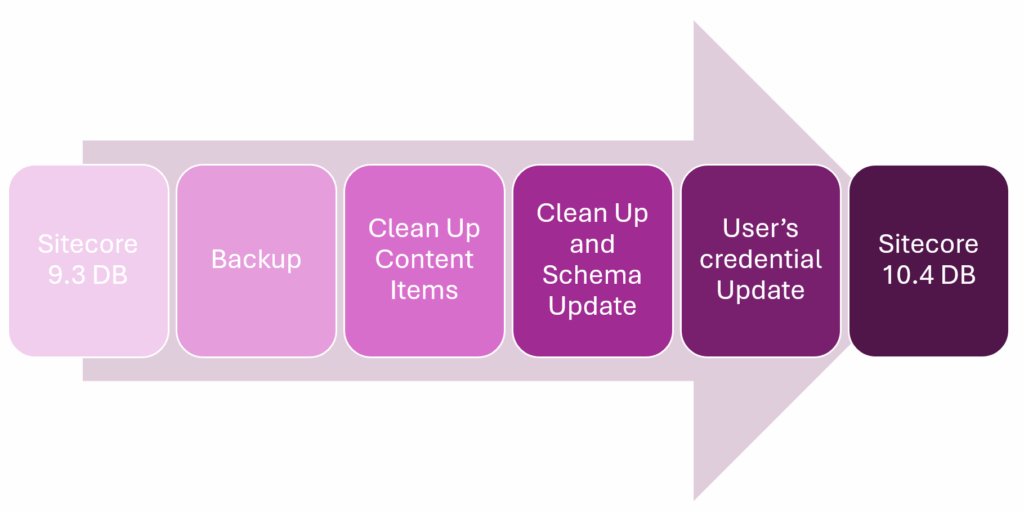
And just like a butterfly 🦋 completing its metamorphosis, our Sitecore database has transformed — from 9.3 to 10.4 — ready to take off in a faster, more stable, and modern environment.
See you! 👋
Leave a Reply